
B1G PLAYER-Official B1G IPTV Player App (USA)
B1G Player is the official streaming app for B1G IPTV subscribers in the United States. It’s the app you use to actually watch your channels, movies, and series after you subscribe — available as a free download for Firestick, Android TV, Android phones, iOS, and PC. If you’re looking for the B1G IPTV player app, a B1G Player download, or help setting it up on your device, this page covers everything: installation, supported devices, subscription info, and troubleshooting.
What is the B1G Player?
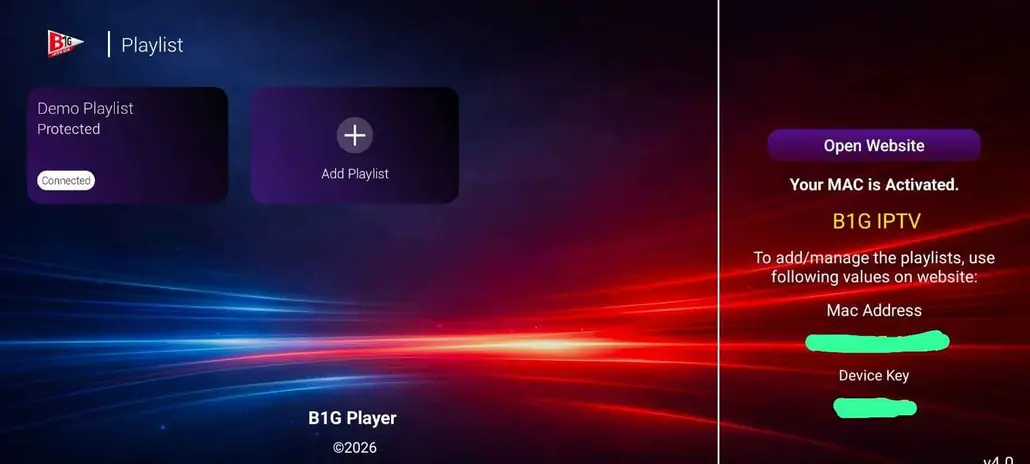
The B1G Player is the official app for watching B1G IPTV. Once you have a B1G IPTV login, you open the app, sign in and your live TV channels, movies and series load in one place with a built-in TV guide.
It is free to download. You only need an active B1G IPTV subscription or a free trial to start streaming. Most people install it on a Firestick or Android TV, and it works with the standard Xtream Codes login.
- Free to download, no hidden fees
- Built for Firestick, Android TV and Android phones
- Live TV, movies, series and an on-screen TV guide
- Works with the B1G IPTV login you get on WhatsApp
How to download B1G Player on your device
Get the official B1G Player in a few minutes. Pick your device below, or read the full IPTV installation guide.
Install the B1G IPTV Player on Firestick in 4 steps
The Firestick is the most popular way to watch, and the B1G Player installs in minutes with the free Downloader app.
Prepare your Firestick
Go to Settings > My Fire TV > Developer Options and turn ON “Apps from Unknown Sources” (and ADB Debugging if you see it).
Install Downloader
Search for “Downloader” (the orange AFTVnews app) on the home screen, install it from the Amazon Appstore and allow the storage permission.
Install the B1G IPTV Player
Open Downloader, type the code below into the URL box, let the B1G Player download and tap Install.
Log in and start watching
Open the B1G Player, enter your B1G IPTV login and wait a minute while your channels, movies and TV guide load.
Install the B1G IPTV Player on Android and Android TV
Choose the official B1G Player, or install a compatible player straight from Google Play.
Option A: Google Play
Search Google Play for 9Xtream IPTV, IBO Player, Cr7player or XCIPTV Player and install the one you like.
Open the app and pick “Xtream Codes API”
This is the recommended login method. Enter the username, password and server details from your B1G IPTV login message.
Option B: Official B1G Player
Install Downloader from the Play Store, enter code 5637737 and install the B1G Player.
Log in and watch
Enter your B1G IPTV login and wait for the channels to load.
Install B1G IPTV Player on iPhone, iPad and Apple TV
Apple devices use a compatible IPTV player from the App Store.
Open the App Store
On iPhone or iPad search for Smarters Player Lite, IBO Player or VU IPTV Player. On Apple TV install a compatible IPTV player from the Apple TV App Store.
Open the app
Choose the Xtream Codes login option.
Enter your B1G IPTV details
Add your username, password and server details exactly as we sent them.
Wait for the playlist to load
Give it a minute to load your live channels, movies and series.
Install B1G IPTV Player on Windows and Mac
Watch on your computer with a free player from the official store.
Windows: Microsoft Store
Download IBO Player or IPTV Smarters Expert.
Mac: App Store
Install Smarters Player Lite or IBO Player.
Choose Xtream Codes API
Add your B1G IPTV username, password and server details.
Save and stream
Save your login and start watching live TV and on-demand titles.
B1G Player APK and latest version
Always download the B1G Player from our official Downloader code or link. Files from random APK sites can be outdated or unsafe.
| Detail | B1G Player |
|---|---|
| App name | B1G Player (official B1G IPTV app) |
| Version | Latest 2026 release |
| Price | Free to download |
| Works on | Firestick, Fire TV, Android TV, Android phones and tablets |
| Downloader code | 5637737 |
| Direct link | aftv.news/5637737 |
| Login method | Xtream Codes API (recommended) |
| Needs | B1G IPTV subscription or free 6-hour trial |
B1G IPTV Subscription Plans
Watch on All Your Favorite Devices. Add Extra Connections to Enjoy Simultaneous Streaming on Multiple Devices.
1 Month
- 40,000+ live channels
- 150K+ movies & series
- HD / 4K + TV guide
- WhatsApp support
3 Months
- 40,000+ live channels
- 150K+ movies & series
- HD / 4K + TV guide
- WhatsApp support
6 Months
- 40,000+ live channels
- 150K+ movies & series
- HD / 4K + TV guide
- WhatsApp support
12 Months
- 40,000+ live channels
- 150K+ movies & series
- HD / 4K + TV guide
- WhatsApp support
1 Month
- 80,000+ live channels
- 150K+ movies & series
- HD / 4K + TV guide
- Priority WhatsApp help
3 Months
- 80,000+ live channels
- 150K+ movies & series
- HD / 4K + TV guide
- Priority WhatsApp help
6 Months
- 80,000+ live channels
- 150K+ movies & series
- HD / 4K + TV guide
- Priority WhatsApp help
12 Months
- 80,000+ live channels
- 150K+ movies & series
- HD / 4K + TV guide
- Priority WhatsApp help
Want the full price breakdown? See our B1G IPTV Subscription page, or ask us on WhatsApp.
ENGINEERED FOR PERFECTION
The B1G Player is built for the big screen, with 4K HDR video fidelity, a fast TV guide and a clean interface that makes live TV, movies and series easy to find.
Buffer Reduction
Smoother live streams, even when the whole country is watching the same game.
Channel Switching Speed
Flip between channels almost instantly, with no long loading screens.
Advanced EPG
Faster loading and precise channel metadata. Our TV Guide stays in sync with real-time broadcasts in the USA and worldwide.
Fluid UI
A cinematic interface designed for the big screen. Navigate with ease between Live TV, VODs, and Series categories.
Smart Favorites
Predictive content suggestions based on your viewing history. Pin your most-watched channels for instant access.
USA Optimized Streaming
Strategic server locations across North America ensure minimum latency and peak performance during live NFL, NBA, and MLB games.
Video Fidelity: 4K HDR
Sharp, colorful 4K HDR picture on compatible TVs and streams.
Free to Download
The app costs nothing. You only need a B1G IPTV login to start streaming.
B1G Player not working? Quick fixes
Most problems take a minute to fix. Try these before you contact support.
Retype your username, password and server details exactly as we sent them, with no extra spaces, and choose Xtream Codes API. If it still fails, message us on WhatsApp.
First check your internet, then close and reopen the app and restart your device. Give the playlist a minute to sync. If many channels fail at the same time, message us and we will check the server.
Use a wired connection or 5 GHz Wi-Fi, close other apps and restart your router. As a general rule, 25–30 Mbps per device keeps streams smooth.
Make sure “Apps from Unknown Sources” is turned ON for Downloader in your Firestick Developer Options, then re-enter the code 5637737 and try again.
We recommend the latest official release, which has the newest fixes. Older APK files from third-party sites may not work with the current service.
Download the B1G Player and test it free for 6 hours
Install the app, then message us on WhatsApp for your free B1G IPTV login. Check the channels, the 4K picture and the TV guide on your own screen before you pay.
Frequently Asked Questions
Find quick answers about downloading, installing and using the B1G Player. Need a full walkthrough? See the IPTV installation guide.
Install a compatible IPTV player app from your TV’s app store (or sideload via USB on older models), then enter the M3U URL or Xtream Codes provided in your subscription email.
B1G Player works with standard third-party players people commonly recommend (TiviMate, IPTV Smarters, GSE Smart IPTV) in addition to our own app — any Xtream Codes/M3U-compatible player will work with your subscription.
No — you can download B1G Player for free at any time. You’ll only need an active subscription (or free trial) to actually stream content once the app is installed.
B1G Player supports Firestick, Android TV, Android phones, iOS, Windows PC, Mac, and MAG/Enigma boxes — it’s not limited to Firestick.
The B1G Player is the official app for watching B1G IPTV. You sign in with your B1G IPTV login and your live channels, movies and series load in one place with a built-in TV guide.
Use the Download B1G Player button at the top of this page or the direct link aftv.news/5637737. On a Firestick you can also enter the Downloader code 5637737.
The official Downloader code for the B1G Player is 5637737. Open the Downloader app, enter the code and install the app.
Yes, the B1G Player is free to download. You need an active B1G IPTV subscription or a free 6-hour trial to stream channels and movies.
This page lists iOS among supported devices. If the app is not available for your iPhone or region, use a compatible Xtream Codes player such as Smarters Player Lite or IBO Player. See our IPTV installation guide for the steps.
Choose Xtream Codes API and enter the username, password and server details we send you. You can request a free trial login on WhatsApp.
Download the APK only from our official Downloader code or link. Files from unknown APK sites can be old, modified or unsafe.
Check your login details and internet, restart the app and your device, and give the playlist a minute to load. If it still fails, message us on WhatsApp and we will help right away.
Ready to watch? Say hi on WhatsApp.
Start with the free 6-hour test, or ask us anything about B1G IPTV. We reply fast.