IPTV Customer Support During Live Events: What to Do When Help Goes Silent
The game has just kicked off, your stream freezes, and you message support. Ten minutes pass. Then twenty. Nothing. If that sounds familiar, you already know why IPTV customer support matters more than channel counts or flashy apps.
In this guide, we explain why support goes quiet during live events, what to do in the first five minutes when a stream fails, how to write a message that gets fixed fast, and how to test a provider’s support before you pay. At the end, we show how B1G IPTV handles support on game day, so you can judge for yourself.
Quick note: no provider can promise zero problems on every game, and this guide is not legal advice. Always stream in line with the laws where you live. Details about B1G IPTV come from our own contact and refund pages.
Why IPTV Customer Support Goes Quiet When You Need It Most
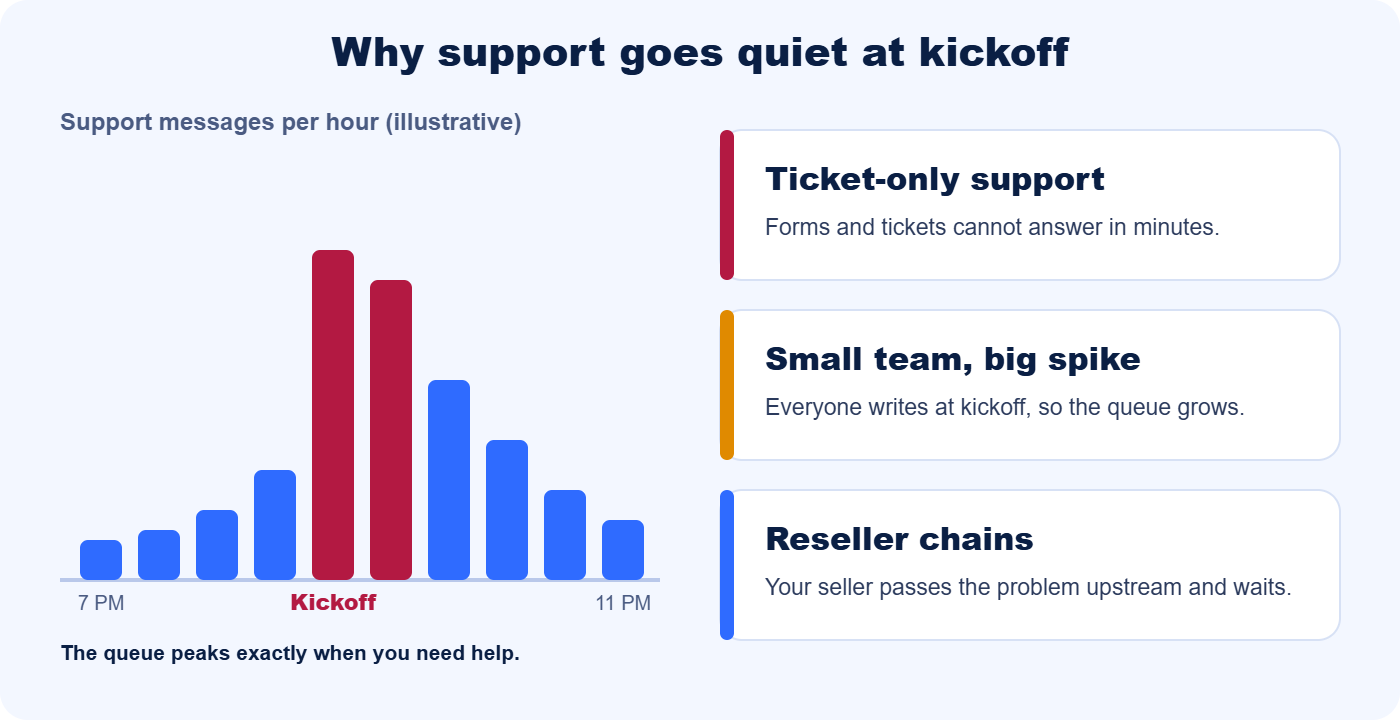
Support is easy on a quiet Tuesday. The hard moment is kickoff, when thousands of viewers hit the same problem at the same time. Three things usually go wrong.
Everyone needs help at the same moment
The same demand spike that overloads streams also floods support inboxes. Even large platforms struggle: during recent Super Bowl broadcasts, users complained about service interruptions on several major streaming services, and reports described generic apologies or “file a ticket” replies. If giants cannot answer everyone at kickoff, a small provider with a thin team has even less room.
Ticket-only and email-only support
A contact form or ticket system can take a day to answer. Some providers publish response times of 48 hours or more, which is useless when the game lasts two hours. For live sports, you need a channel where a real person can reply in minutes.
Small teams and reseller chains
Many IPTV services are resold. When you buy through a reseller, your problem may need to travel up the chain before anyone with server access sees it. Each handoff adds waiting time, and the match does not wait.
The Real Problems Fans Report
Public review sites show the same stories again and again. One user complaint, which we cannot verify, describes constant freezing during live sports, support that was offline, and an account blocked after the user reported the issue. The details differ, but the patterns repeat:
- Support is offline when matches start. Evening and weekend games are exactly when many teams are unreachable.
- Replies that never answer the question. Copy-paste answers waste the few minutes you have.
- Ignored refund requests. The money is gone and so is the response.
- Accounts blocked without explanation. Reporting a fault should never get you locked out.
Each of these is a warning sign you can spot before you pay. We show how later in this guide.
Rule Out Your Own Setup First: A 2-Minute Check
Many “IPTV not working” moments are setup problems, not provider problems. Before you message anyone, run this quick check:
- Test another app. If YouTube or Netflix also stalls on the same device, the problem is your internet or Wi-Fi.
- Try another channel. If a different channel plays fine, the first feed is overloaded, not your connection.
- Restart and update. Fully close the app, restart the device and update the player. On a Firestick, also clear the app cache.
- Lower the resolution. Drop from 4K to 1080p or 720p to see if bandwidth is the issue.
For the full walkthrough, see our guide to IPTV buffering during big games. If you are on a Firestick, our installation guide shows how to set up the B1G Player cleanly. If other apps stream fine and every IPTV channel fails, the cause is likely on the provider side, and it is time to contact support with proper details.
What to Do During the Game: A 5-Minute Plan
When the stream fails mid-match, panic wastes minutes. Follow this order instead. Most steps take under a minute.
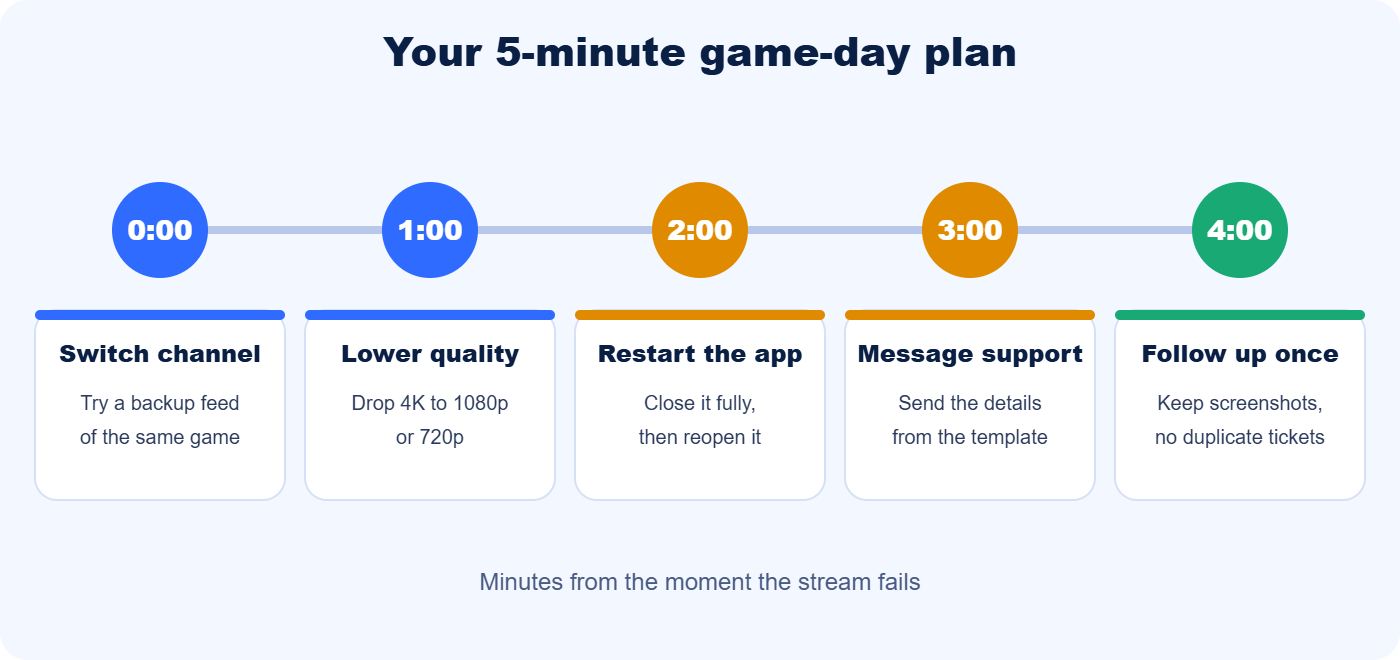
- Switch to a backup channel (0:00). Popular games often run on more than one channel. If the backup works, you can watch while you sort out the rest.
- Lower the quality (1:00). Drop 4K to 1080p or 720p. A smooth HD picture beats a frozen 4K one.
- Restart the app (2:00). Close it fully, then reopen it. Restart the device if the app is still stuck.
- Message support (3:00). Send one clear message using the template below. Include a screenshot.
- Follow up once (4:00). If you hear nothing, send a short follow-up on the same thread. Duplicate tickets can slow everyone down, including you.
While you wait, check whether other viewers report the same problem on the provider’s official channels. If many people do, it is likely a feed or server issue, and the fix is on the provider side.
How to Write a Support Message That Gets Fast Help
“It is not working” costs minutes, because support has to ask you questions before they can help. A complete first message gets you a useful answer faster.
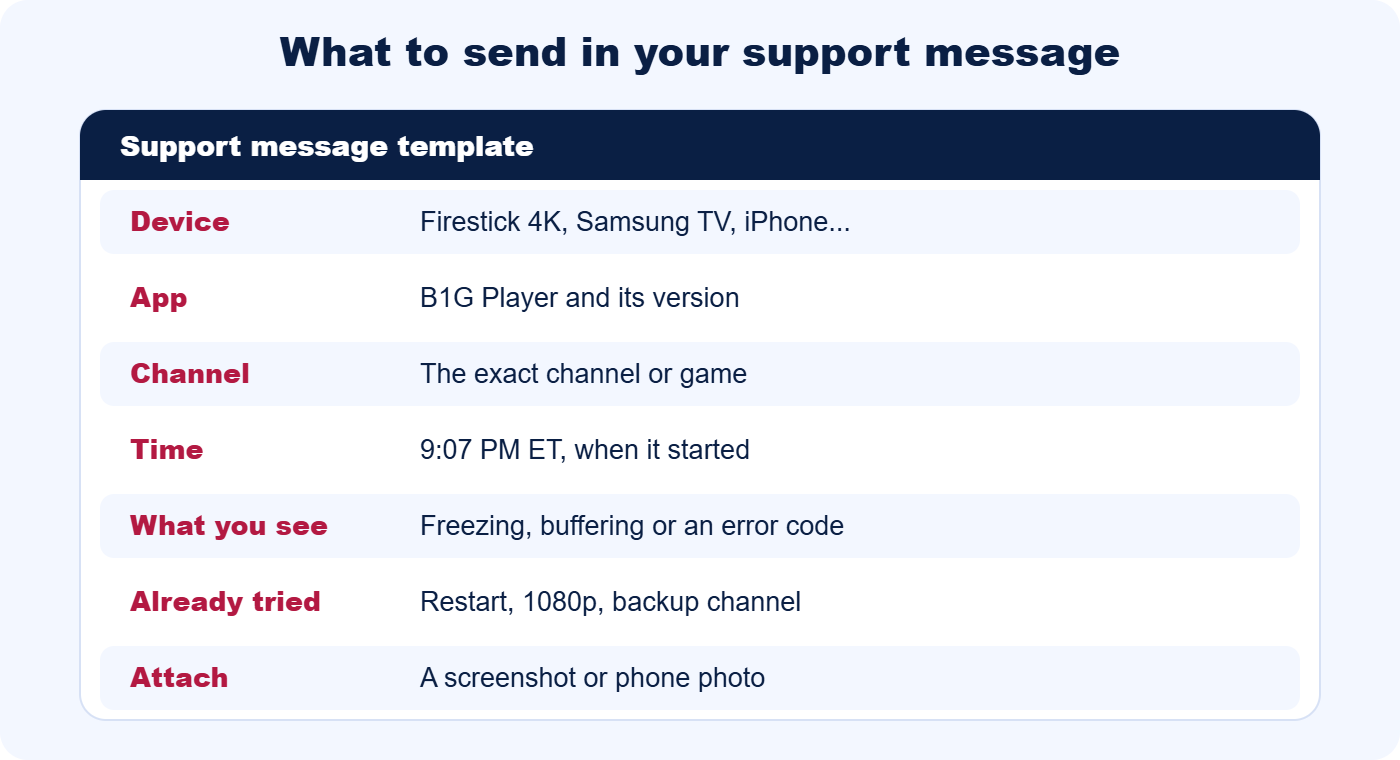
Here is an example you can copy: “Hi, my Firestick 4K freezes on [channel name] since 9:07 PM ET. B1G Player is updated, I restarted the device, tried 1080p and a backup channel. Screenshot attached. Account email: [your email].”
- One issue per message. Mixing billing and streaming problems slows down both.
- Never send your password. Support only needs your account email or order number.
- Stay on one thread. Keep everything in one chat so the team can see the history.
- Save the evidence. Screenshots, times and order numbers help if you need a refund later.
How to Test an IPTV Provider’s Support Before You Pay
Support quality is easy to check and hard to fake. Before you subscribe to any provider, run this simple test. It works as a guide to how to choose an IPTV provider you can rely on.
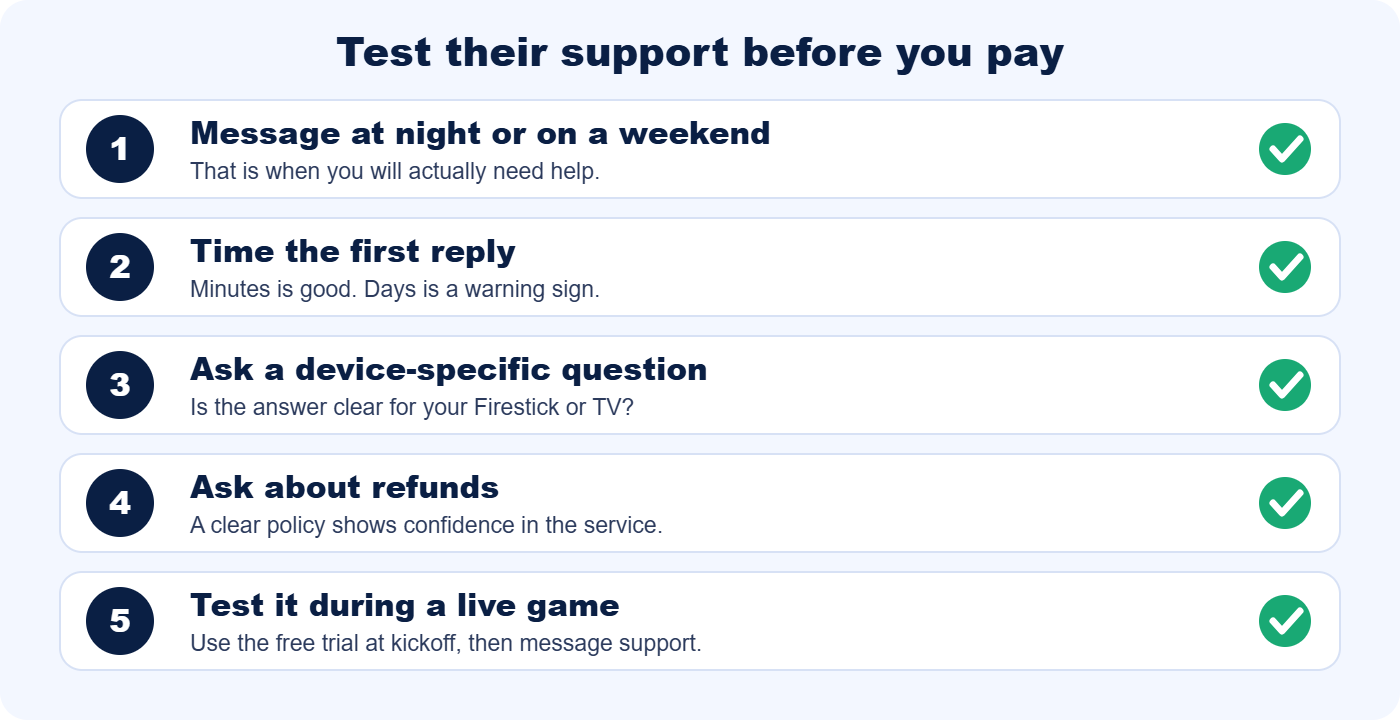
- Message at night or on a weekend. That is when you will actually need help, so that is when to test.
- Time the first reply. Minutes on chat is good. Days is a warning sign.
- Ask a device-specific question. A good answer names your device and gives clear steps, not a copied paragraph.
- Ask about refunds. A clear policy shows confidence in the service.
- Use the free trial at kickoff. Watch a live game, then message support with a real question and see what happens.
Any provider confident in its service will offer a trial. B1G IPTV offers a free 6-hour trial, so you can test channels and support with no payment first.
Red Flags and Payment Safety
Some warning signs are visible before you pay. Watch for these:
- No live chat, only a form or an email address.
- Replies that take days, or a published response time of 48 hours or more.
- No refund policy, or a vague one.
- No clear contact details or business information.
- Wild claims such as “100,000+ channels” or “never buffers.”
- Payment only by methods with no way to dispute a charge, such as gift cards or wire transfers.
For payment safety, prefer methods that give you a way to raise a dispute, such as cards and major wallets. Start with a monthly or quarterly plan before committing to a year, keep your receipts and order numbers, and keep a backup option ready for big events. Reading the refund policy takes two minutes and tells you a lot.
What to Do If Your Provider Is Not Answering at All
Sometimes the silence is total. If chat, email and tickets all go unanswered, work through these steps calmly:
- Give tickets and email a few hours. Chat should answer in minutes, but email and forms can take longer. Wait several hours before a second message.
- Try every official channel. Use chat, Telegram, email and any official social account, and keep each message short and clear.
- Keep records. Save screenshots, dates, order numbers and every reply or lack of reply.
- Check the refund policy. If you are inside the refund window, request your refund through the official channel with your order number.
- Contact your payment provider if needed. If you paid by a method with dispute protection and the provider has gone silent, your payment provider can explain your options.
- Keep a backup for big events. A second option on a short trial means one failure does not ruin the game.
If a provider stays silent for a full day or more after you pay, treat it as a serious warning sign. Next time, run the support test above before you hand over any money.
What Reliable IPTV Support Looks Like
A reliable IPTV provider is not one that never has problems. It is one that fixes them quickly and tells you the truth. Whether you are searching for a reliable IPTV service or comparing providers, look for:
- Real people on chat. WhatsApp, Telegram or live chat, not only a ticket form.
- Fast replies. Minutes on chat, and a stated time for email.
- 24/7 coverage. Games happen on evenings, weekends and holidays.
- Device-specific help. Clear guides and an app that is easy to install.
- A clear refund policy. Written, specific and easy to find.
- Honest answers. Support that says what is wrong instead of blaming you.
How B1G IPTV Handles Support on Game Day
Everything above comes down to one question: when something breaks at kickoff, is a real person there? Here is how B1G IPTV answers the problems fans report most:
| The problem | How B1G IPTV helps |
|---|---|
| Support is offline when the game starts | A 24/7 support team on WhatsApp and Telegram, so help is there during evening and weekend games. |
| Hours of waiting for a reply | WhatsApp and Telegram messages are usually answered within minutes. Email gets a reply within 12 hours. |
| Faceless ticket forms | Real people on chat, with priority WhatsApp help on Premium plans. |
| Setup trouble on Firestick or Smart TV | The free B1G Player, a step-by-step installation guide and help by device. |
| Not sure before paying | A free 6-hour trial, so you can test channels and support before you subscribe. |
| Worried about wasted money | A 7-day unconditional refund on all plans. After 7 days, refunds are calculated by usage, as explained in the refund policy. |
You can reach the team on WhatsApp at +1 631 690 4864, on Telegram at @b1giptvus, or by email at b1giptvus@gmail.com. The contact page lists all options. WhatsApp is the fastest.
No service is perfect, and we will not claim that. What matters is how fast problems get fixed and whether you can reach a real person. That is why we encourage you to test us. If you like what you see, compare the B1G IPTV subscription plans.
Frequently Asked Questions
Why does IPTV customer support go quiet during big games?
Because everyone needs help at the same moment. Evening kickoffs create a spike in messages, and providers with small teams, ticket-only support or long reseller chains cannot answer fast enough. Live chat channels with 24/7 coverage handle these spikes far better than forms and email.
How fast should IPTV support reply during a live event?
On chat, you should expect an answer in minutes. Email can take longer, but a reply time of 48 hours is far too slow for live sports. At B1G IPTV, WhatsApp and Telegram messages are usually answered within minutes, and email within 12 hours.
What should I include in an IPTV support message?
Include your device, the app and its version, the exact channel, the time the problem started, what you see (freezing, buffering or an error code), what you already tried, and a screenshot. Never send your password. Your account email or order number is enough.
What should I do if my IPTV provider is not answering at all?
Try every official channel, keep screenshots and order numbers, and wait a few hours between follow-ups on email or tickets. If you are inside the refund window, request a refund through the official channel. If you paid by a method with dispute protection, your payment provider can explain your options.
How can I test IPTV customer support before paying?
Message the provider at night or on a weekend, time the first reply, and ask a device-specific question and a refund question. Then use the free trial during a live game and contact support with a real issue. The speed and quality of the answers tell you what paid support will feel like.
Can I get a refund if streaming fails during a game?
That depends on the provider’s policy, so read it before you pay. B1G IPTV offers a 7-day unconditional refund on all plans. After 7 days, refunds are calculated based on usage, as explained on the refund policy page.
Which payment methods are safest for IPTV?
Prefer methods that give you a way to raise a dispute, such as cards and major wallets. Be careful with gift cards and wire transfers, which leave little recourse. Start with a monthly or quarterly plan and keep your receipts.
Is WhatsApp support better than email for IPTV?
For live events, yes. WhatsApp and Telegram let you send screenshots and get answers in minutes, while email is slower and better for non-urgent questions. A good provider offers both and states the expected reply time for each.
What can I do myself while waiting for support?
Switch to a backup channel, lower the resolution, restart the app and the device, and check whether other apps stream normally. Our guide to IPTV buffering during big games covers the full test. Often these steps fix the problem before support replies.
Is a free trial enough to judge IPTV support?
It is the best starting point. During a trial, test the service at peak time and message support with a real question. If replies are quick and clear when you are not yet a paying customer, that is a good sign. B1G IPTV offers a free 6-hour trial for exactly this reason.
Final Thoughts: Choose Support That Shows Up at Kickoff
Great channels mean little if no one answers when the stream fails. Know the 5-minute plan, write clear support messages, and test any provider’s support before you pay. Those three habits will save you from most game-day disasters.
Ready to test it yourself? Start your free B1G IPTV trial, install the B1G Player, and message us during the next big game. Following a specific league? See our guides to NFL IPTV, NBA and MLB IPTV, UFC IPTV and NHL and MLS IPTV, or browse the B1G IPTV blog.